

Map FTP, SFTP, S3, Wasabi, TrueNAS as a Drive using BackupChain DriveMaker
Access FTP, SFTP, and S3 Sites With a Real Drive Letter: DriveMaker Freeware
DriveMaker Freeware mounts or maps an FTP, FTPS, Amazon S3, S3 compatible storage, Wasabi, TrueNAS, or SFTP site to your desktop or Windows Server to a drive letter or a network drive, for example: D:. Now you can use Microsoft Office, Notepad, the command prompt and any other of your favorite tools to access the files on your FTP / SFTP server or S3 bucket just like the files you have on your PC, including anti-virus programs.
You can also use Drivemaker to set up your own secure private cloud backup server with BackupChain, our backup solution, which has a secure FTPS server built-in.
Our notable customers include: General Dynamics, Boeing, Supreme Court and all District Courts of Albania, BNP Paribas, HP (Hewlett-Packard, California) and the City of London. See more.
Download v12.0.405 Buy DriveMaker Plus Check out DriveMaker Plus Help & FAQ
Completely Free for Personal as well as Commercial Use
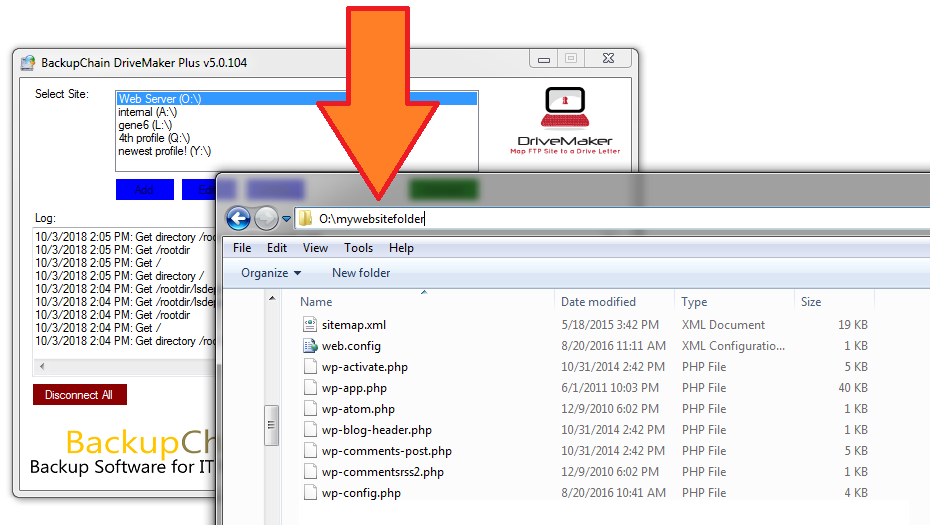 The basic version of DriveMaker is free, even for commercial purposes, forever. (Redistribution is not permitted, however. You need to download DriveMaker each time from the link above on this page). Runs on Windows Server 2025 – 2008 or Windows 11 – Vista.
DriveMaker Plus is the paid version with additional features and is included in all BackupChain licenses, or you can buy it separately by clicking on the link above. The Plus edition is available as a perpetual license for a one-time fee. It may also be obtained free, see sections below.
Map Drive Over Internet Without a VPN
Connecting to a file server is easy and simple. You enter the FTP, FTPS, SFTP, or S3 details and DriveMaker connects and provides a real drive letter. No need to download and upload files, it’s fully automatic. DriveMaker allows you to connect to a remote file server or NAS server over the internet and make it look like a real drive, without having to set up a complicated VPN.
The Innovative Alternative to FTP Clients: Mount a Drive Instead
FTP clients and other cloud storage tools require you to download files before you can edit them. Then, you need to upload them back to your FTP / SFTP server after you’re done. Not only is this inconvenient, it may also lead to data loss when you forget to upload your file back to the FTP / SFTP / S3 site. DriveMaker gets rid off this inconvenience by mapping cloud storage to a virtual local drive.
Use Your Favorite Applications to Edit Online Files In-Place via Mapping a Drive
Using BackupChain DriveMaker you can simply set up a drive letter, for example X:\, to access your FTP files via the application of your choice. DriveMaker enables standard Windows applications to access your FTP files, so you can edit your files on the web directly from Microsoft Office or Notepad without having to download and upload the files repeatedly.
Set up Your Own DIY Cloud Storage and Access via Mapped Drive
Would you like to set up your own Google Drive or OneDrive alternative storage and access it via a mapped drive, just like a real drive? Check our step-by-step guide.
Use Your Anti-Virus Program to Scan Your FTP / SFTP / S3 Bucket Online with a Drive Letter
Because your FTP site is accessible via a drive letter, such as X:\, your anti-virus software will automatically scan it when you access files on it. In addition, you can scan the entire FTP site using your standard anti-virus program.
Search Files via Windows Desktop Search, Google Desktop Search, or Other Tools
Since all FTP files and folders are mounted locally as an FTP drive, you can use standard tools to search your files, such as Windows Desktop search, WinGrep, and even a DOS command prompt command, such as: dir myfile*.* /s
Synchronize Files and Folders with File Versioning
DriveMaker now has a sync feature that allows you to sync local folders to remote folders. New file versions are only created when a file changes. Instead of deleting the older file version in the remote folder, it renames it with a date suffix. This ensures you always have the previous file version if you need it.
Command Line Support
Using DriveMaker you can use the command prompt to access your FTP / SFTP files as well. For example: xcopy, dir, move, etc. Older DOS tools can hence be utilized on online files located on a mapped FTP site:
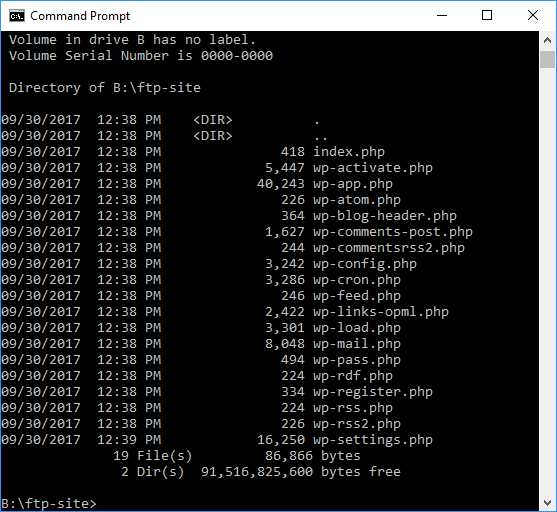
Command-line Interface
Use the following command line tool to connect and disconnect to sites from batch files, Powershell, and other scripts:
If you have a DriveMaker password defined that restricts access to the application:
DriveMakerCLI.exe AppPassword [DriveMaker App password] CONNECT “[site name]”
DriveMakerCLI.exe AppPassword [DriveMaker App password] DISCONNECT “[site name]”
Or without the application password:
DriveMakerCLI.exe CONNECT “[site name]”
DriveMakerCLI.exe DISCONNECT “[site name]”
Amazon S3 and S3 Compatible Storage, such as Wasabi
Version 10 adds support to map a drive to your Amazon S3 and compatible storage.
SFTP Support
SFTP is supported since v4. Note that DriveMaker also offers “explicit FTPS” which encrypts FTP over TLS/SSL and is also secure.
DriveMaker also assumes the target FTP server is fully standards compliant. Unfortunately, many FTP servers are not, such as some FTP servers embedded in many Linux powered NAS devices. Ideal FTP targets to be used with DriveMaker are Microsoft IIS7 or later, BackupChain FTP server, and the BackupChain Cloud Service.
SFTP and FTP Can Function as a Simple VPN Alternative
This has to do with how FTP works and is not a DriveMaker limitation. You can use FTP in a multiuser setting but FTP is not meant to be used as a full replacement for VPN, especially not in a multi-user environment. FTP does not offer a way for files to be locked. In addition, FTP does not allow random file access, meaning that you cannot read from and write into files a specific points. Hence, you cannot use FTP to run databases directly from storage and similar scenarios where random file access is required to occur in-place.
It is possible to open Microsoft Access databases directly from storage and they will work fine but the Access file won’t be locked. The database changes will be uploaded when you close the database. In the meantime, however, the database is not locked, so you can’t have several users accessing the database simultaneously, unless it’s a read-only database.
Files are cached locally and uploaded in full when you finish editing. The same happens with directory contents for better performance. You won’t see immediately changes made by others if the other users are working on the same files or inside the same directory.
DriveMaker offers a Virtual File System
There are limitations with FTP itself as well as by the FTP server’s underlying file system. If the operating system at the FTP server side doesn’t support certain file names, lengths, or certain characters, the file transfer will not work properly with such files. NTFS supports unlimited file sizes and Unicode file name lengths of over 32,700 characters, whereas most other file systems do not. In addition, certain file names are valid on some operating systems and not on others. You may run into such issues when you use FTP servers that run on operating systems other than Windows. Use IIS7+ or BackupChain FTP server targeting NTFS volumes for best results.
Random file access is not supported by FTP, as mentioned above. Files are downloaded in full, kept in a local cache, and then uploaded when closed. Ergo, while edits take place the file is not locked because FTP offers no file locking mechanism; hence, other users may delete or edit the file in the meantime before the edits are uploaded again.
FTP only offers a way to download and upload files and to view directory contents; these are all the functions you can expect when connecting to an FTP site.
Run Utilities, Batch Files, and PowerShell Scripts Automatically
DriveMaker can be configured to run scripts, executables, PowerShell scripts, or any application when certain events occur, such as: before and after a connection, when a connection attempt fails, or just before the connection is closed.

Limitations
DriveMaker Freeware and DriveMaker Plus are both limited to file sizes of 4 GB. The actual limit is configurable inside the site profile you create. Files larger than 4 GB cannot be handled by DriveMaker; however, given the nature and delays involved with remote drives, you wouldn’t want to access larger files via a virtual drive. Very large files above 4 GB are best handled by backup software, such as BackupChain, which also handles broken links and offers far more features than just file transfer. Alternatively, an FTP client could be used for those types of transfers, which could take hours to complete depending on your internet access speeds.
Limited Compatibility with Certain FTP Servers
To confirm whether DriveMaker works with your FTP / SFTP server, use the freeware version for as long as you like. Use IIS7+ or BackupChain FTP server targeting an underlying NTFS volume for best results.
A Linux-powered FTP server and some Windows-based FTP servers may work for certain types of uses and not for others. That’s because some products do not implement the entire standard or use their own dialects, or the FTP server does not run on top of NTFS and you have files that require NTFS support.
Tech Support
We offer tech support for DriveMaker Plus when used with Microsoft IIS7+ or BackupChain’s embedded FTP/S server.
What does DriverMaker Plus offer that DriveMaker Freeware doesn’t?
- DriveMaker Plus has no session time limit.
- DriveMaker Plus allows you to encrypt files transparently on the server, where they remain encrypted
- Technical support for one year
Easy Installation
Download and installation only takes a minute; there are no drivers to install and no reboots are required. On Windows Server platforms, you may need to add the feature “Desktop Experience” via the Server Manager (which subsequently may require a reboot to complete). Also, DriveMaker requires .Net Framework v4.
To install on Windows Server 2016 without full user interface, run this PowerShell command (you will need to reboot the server):
Install-WindowsFeature WebDAV-Redirector –Restart
Ideal Usage Scenario
As a complement to your remote backup software, DriveMaker is ideal for regular business file usage (files less than 4 GB), targeting a Microsoft IIS 7+, BackupChain FTP Server, or the BackupChain Cloud Backup Service.
How to Get a Full DriveMaker Plus License for Free
The DriveMaker Plus license is a one-time purchase. You can buy licenses or you could get one for free by doing the following: Do you own a blog or company website? Simply add a permanent backlink to https://backupchain.com, preferably using the logo or the BackupChain brand name, let us know and we’ll email you a free license code.
