

BackupChain®: More Than Hyper-V Backup — A Complete Windows Server Protection Toolkit Without Subscription
Optimized for Windows Server 2025 and Windows 11
Backup, restore, migrate, and recover your Windows servers and Hyper-V virtual machines with one easy-to-own software package. BackupChain includes unlimited VM backup, P2V / V2P / V2V conversion, disk cloning, imaging, and disaster recovery features with a one-time license.
The BackupChain toolset includes a fully automated Hyper-V backup software with dozens of features that give you total control over what and how backups are done. These features help you set up efficient and fine-tuned backups, exactly the way you need them to be, using open standard formats. BackupChain Backup Software became the most versatile Hyper-V backup solution used by notable organizations worldwide in over 80 countries, and also supports Azure Stack HCI backup.
BackupChain offers Hyper-V disk backup as well as unlimited Hyper-V virtual machine backup on Hyper-V Server and Windows Server 2025 – 2008 as well as Windows 11 – 8. Apart from backing up VMs individually, you can also backup the hypervisor host disks separately into a disk image or clone them to another physical disk to protect your host’s operating system and the virtual machines on the server. Disks and VMs may be backed up separately and individually, helping you implement a complete and efficient disaster recovery strategy.
- Unlimited Hyper-V virtual machine backup with just one, portable, one-time charge, lifetime license.
- Includes Hyper-V Resilient Change Tracking (for lightning fast and efficient incremental/differential backups) as well as VSS-based backups
- We help you set up your Hyper-V backups. 24/7 Monitoring, Recovery, and Emergency Assistance is also available to Platinum license holders.
- Azure Stack HCI backup and Cluster Shared Volumes (CSV) support.
- Host disk backup, imaging, and live cloning.
- Centralized Management of all your servers
- Incremental and differential backups; Efficient in-line deduplication, delta compression, even over standard FTP
- Copy virtual machine while running as-is to another backup server, network share, FTP, or USB drive
- Includes bare-metal recovery, disk image backup, and disk cloning for the host disks
- Includes P2V converter (physical disk to VM), V2P converter (VM to disk), and V2V conversion (VM format conversion)
- Backup physical servers to Hyper-V, VMware, or VirtualBox for immediate recovery using automated P2V component
- Cloud Backup your Hyper-V virtual machines and physical servers, files, databases, etc. You can even host your own cloud server with BackupChain and save money.
- Restore VMs on any new server.
See it in Action: Unlimited Hyper-V Backup on Windows Server 2025 and Windows 11
Fully Automatic, Live Virtual Machine Hyper-V Backup
on Windows Server 2025 – 2008 and Windows 11 – 8
One license of BackupChain backs up an unlimited number of Hyper-V virtual machines on a single Hyper-V host. Unlike other tools, you don’t need to purchase additional licenses for VMs or CPU sockets.
BackupChain runs on all Windows Server 2025, 2022, 2019, 2016, 2012 / R2, and 2008 / R2, and also offers Hyper-V backup in Windows 11, Windows 10 and Windows 8.
Hyper-V virtual machine backups are live, do not interrupt VMs, and all you need to do to configure a backup is to select the virtual machine from a list and enter a target for your backups.
There are two ways to back up virtual machines using our automatic feature:
1. File-based Hyper-V backup: You simply select your folder that contains the VMs, such as C:\VHDs
2. Virtual machine-based / Automatic Hyper-V backup: You select the virtual machine from a list and BackupChain configures the task automatically. See this Hyper-V guide for more information on how to back up Hyper-V guests.
BackupChain supports Cluster Shared Volumes, failover cluster, and sequential backup. The “sequential” option ensures your server’s resources are only used to a minimum by backing up one virtual machine at a time. This is important when you have a production system with dozens of VMs and want to minimize the system impact of your backups.
Hyper-V checkpoints are included in backups and correctly restored even on new hosts.
To restore a VM Hyper-V backup, simply select it from the restore screen and press ‘Restore’. You may also use the clone virtual machine feature, which is enabled by default.
Note, you may back up VMs to a local folder, external drive, a network share, or via FTP using an efficient deduplication algorithm which dramatically reduces processing time, bandwidth, and space requirements.
BackupChain Hyper-V Backup Pays for Itself: Save on Expensive Storage Costs
On average you can expect to fit 18 versions of a 1 TB virtual machine in a 4 TB drive; i.e. 5 times more. Whether you store your Hyper-V backups to USB, a high-quality RAID array, or the cloud, the storage savings deduplication and compression achieve are enormous.
Moreover, technical support is included in your license. Apart from saving you money, we also can help you get your backups set up quickly, and exactly the way you want them to work.
No Agents Needed — Agentless
You only need to install Hyper-V Integration Services (shipped with Windows). There is no need to install anything inside virtual machines; all features work from the host, including the Granular Backup feature described below, which is part of BackupChain Server Enterprise Edition.
Restore VMs on New Virtual Hosts, Clone Machines Optionally
Virtual machines may be restored anywhere: On new hosts, or on the original host in a side-by-side configuration. Name clashes are automatically avoided using BackupChain’s clone function when restoring (this is the default option).
Sequential VM or Simultaneous Replication
BackupChain includes a crucial feature missing from many other tools on the market: the ability to run tasks in sequence, one by one rather than all simultaneously. Running tasks sequentially dramatically reduces stress on your host server; however, BackupChain also includes a simultaneous option so you can protect several virtual machines consistently to get a true, multiple-machine point-in-time image.
Restore Older Versions of Virtual Machines or Older Versions of Data Files
BackupChain may be configured to retain any number of virtual machine images. You can restore entire VM disks or just files or folders from within VM images (see Granular Backup & Restore below)
Backup and Restore Hyper-V Checkpoints / Snapshots
Even though Microsoft strictly recommends against the use of Hyper-V snapshots on production systems, you can back up and restore snapshot chains even to new servers (of similar CPU architecture and Windows version).
Boot Instantly from Target Folder
You will find BackupChain gives you full control over the data formats like no other backup software. You can use file-level deduplication, ZIP (or variants of ZIP) compression, encryption, or no processing at all. The latter option allows you to instantly boot VMs directly from your target folder. See Hyper-V Instant Recovery Strategy
Protect Microsoft Exchange and SQL Server Virtual Machines
BackupChain uses VSS to ensure application consistent backups of your virtual machines. Backing up Exchange 2007 or later and SQL Server 2005 and later is hence no problem. You can use the Granular Backup and Granular Restore features discussed below to take folder copies of Exchange and SQL services from the host. Using the Granular Restore feature you can restore point-in-time versions of Exchange or SQL Server without
restoring the entire Hyper-V virtual machine.
Granular Backup and Granular Restore for Hyper-V
BackupChain Server Enterprise Edition includes two unique features: Granular Backup and Granular Restore on all modern virtual machine platforms.
Granular Backup is an innovative new Hyper-V backup feature that allows you to back up individual files residing inside a virtual machine, but from the host and without the need to install software inside the virtual machine (agentless). You simply run BackupChain on the host and select files or folders inside the virtual machine’s file system and BackupChain takes care of the rest.
First you select the virtual disk file. Supported are VHDX, VHD, VDI, and VMDK files.
Then simply select the files or folders you want backed up inside the virtual machine:
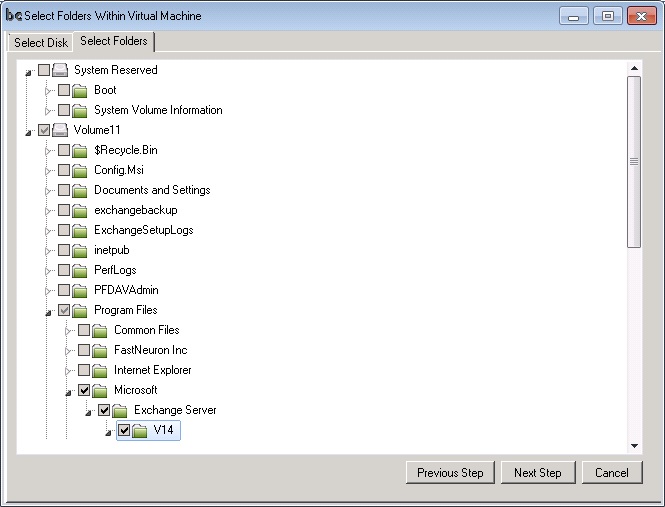
BackupChain will only involve those virtual machines you select. By protecting only the virtual machines you need, BackupChain reduces the load on your server.
Granular Restore is a useful feature to cut restore time dramatically if you only need a subset of your virtual machine data restored. You can open your full virtual machine images (deduplicated and compressed, or plain format) using BackupChain’s Restore Screen and simply double click on a file to restore it. Alternatively you can select several files and folders and extract them to your hard drive. The extraction
process does this without restoring the entire virtual machine.
Note: Both Granular Backup and Granular Restore are only available in the BackupChain Server Enterprise and Platinum Editions.
Graphical User Interface Even on Windows Server 2025 Core Installations and Hyper-V Server
Connect to a Windows Core Server via Remote Desktop and work with a graphical user interface instead of the command line. You can create copies of VM data stored on local drives, iSCSI, SAN, and Cluster Shared Volumes to any local, network, or FTP targets with smart deduplication (delta compression) technology that saves costs, resources, and time. ZIP, uncompressed, and other formats are also available. Database server and file
protection are also supported.
BackupChain runs on all Microsoft Windows Server and Hyper-V Server versions with full graphical user interface:
1. On Azure Stack HCI: BackupChain provides a full graphical user interface
2. On Microsoft Hyper-V Server 2019 – 2008, Microsoft’s free server operating systems.
3. On Microsoft Windows Server 2025 / 2022 / 2016 / 2012 / 2008 Full Installation; with Hyper-V Role and,
4. On all Core installations of Microsoft Windows Server 2025 – 2008 with Hyper-V role installed. (Full GUI available in Core installations).
5. On all installations of Hyper-V Server 2019 – 2008 with Hyper-V role installed. (Full GUI available in Core installations).
Protecting Cluster Shared Volumes (CSVs) and Storage Area Network (SANs)
BackupChain Server Editions support Cluster Shared Volumes as well as attached SAN and iSCSI drive protection.
Local, Network, and Remote FTP Targets
Since virtual machine images (VHD files) tend to be many GB large, these heavy-weight files need to be processed efficiently. Ideally the target should be another SCSI drive, an eSATA external drive, an USB drive, or another
machine on a Gigabit network. BackupChain supports all these as well as FTP and FTPS targets to enable data centers to move their virtual machines offsite without sacrificing performance.
Deduplication: Incremental and Differential Delta Compression Technology
In some data protection tools “incremental backups” mean that the program will only process files that changed; however, in the case of virtual machine duplication, the files are so big that it is not an option to retain a full copy of each VM at each backup cycle. BackupChain contains proprietary in-file delta compression technology to ensure data copies use only minimal amounts of space. This form of compression reduces the load in the target store but it also reduces bandwidth requirements because only the actual change within the VM is stored. This is why BackupChain is perfectly suited for remote backups, even via FTP. Because BackupChain’s backup technology does not require a local history of VMs from previous cycles, your servers can run on minimal equipment. This advantage is crucial to transport incremental and differential backups over the Internet.
High-Speed Data Compression using Multiple CPU Cores
Data compression is standard feature in most data protection programs; however,when it comes to large file backups, it is necessary to provide the best compression rate within a reasonable amount of time. In order to keep the processing time to a minimum, optimal resource usage is necessary. BackupChain offers full CPU utilization as a standard feature without CPU or CPU core number limitations. BackupChain compresses and encrypts files (optional) with AES-256 (HIPAA compliant encryption) and utilizes all CPUs and CPU cores simultaneously. This technology draws the highest possible data rate from your RAID controller.
Powerful Multithreaded Task Scheduling
BackupChain is equipped with a flexible scheduler that permits complex schedule settings and concurrent execution. This feature of BackupChain allows administrators to utilize their resources to fullest extent possible and create protection tasks at complex intervals as needed.
Remote Hyper-V Virtual Machine Replication and Restore Features
BackupChain is the only data protection program on the market with a built-in FTP server and client, which are the building blocks needed to quickly set up an efficient remote replication system. Hyper-V VMs can thus easily be backed up and restored offsite over the Internet at a remote location without the need for additional software. Administrators concerned about security can switch on the military-strength encryption feature and transmit over FTPS as an option.
Open Source Backup File Formats Available
No more vendor lock-in! BackupChain creates backups in open source file formats, such as ZIP, 7z, VHD, and many others. You can also mirror backup Hyper-V VMs to another host as-is, without any file processing, so that files remain in their native format. By using ZIP, for example, you can open Hyper-V backup files anywhere immediately without having to use BackupChain.
Fully Functional 20-day Trial Version Available
The trial version is fully functional, requires no reboots, and is supported by our tech support department. Technical support and development are based in Baltimore, Maryland, USA and may be contacted by email, live chat, and phone.
See it in Action: Set Up Your First VM Backup in Just 3 Minutes
See the Hyper-V backup step-by-step video.
Summary
BackupChain offers the same user interface on full as well as on core installations of Windows and supports Cluster Shared Volumes, iSCSI, and SAN. It offers deduplication support, an advanced scheduler, FTP support, and many additional features to cut processing time and reduce storage usage.
BackupChain also includes Granular Backup, an innovative new technology which allows you to selectively back up files residing in virtual machines from the host without installing agents. You can install BackupChain on Windows 8, Windows 10, Windows 11, Windows Server 2025 / 2022 / 2016 / 2012 / R2, and Core Environments, such as Azure Stack HCI and Hyper-V Server 2019 where BackupChain provides a full user interface.
U.S. technical support for BackupChain is available (9 AM – 5 PM ET) by phone, email, and live chat; a 24/7 support option is also available 24/7 for premium license holders.
Download a full function 20 day trial of BackupChain Backup Software from our download page, and start your backup within minutes!
| Download BackupChain® Buy |
Stephen J. Norman, Senior Vice President, Brandywine Trust Company
More Praise for BackupChain See Notable Customer List